Many businesses wait until a computer fails before replacing it.
At first glance, that approach seems financially responsible. If a laptop still turns on and employees can log in, why spend money on new equipment?
The reality is that aging technology often costs far more than business owners realize. Older computers become slower, less reliable, more difficult to secure, and increasingly expensive to support. Hardware failures create unexpected downtime, employees lose productivity, and outdated systems may no longer meet modern cybersecurity or software requirements.
The most successful accounting firms don't replace technology because it breaks. They replace it according to a strategic lifecycle that balances performance, security, reliability, and budget.
For firms handling sensitive financial information, a proactive hardware lifecycle isn't just an IT best practice. It's an investment in business continuity, employee productivity, and long-term operational efficiency.
Technology Is a Business Asset, Not an Expense
Every business depends on technology to serve clients, communicate with employees, and protect confidential information.
When technology performs well, employees rarely think about it.
When it doesn't, productivity suffers.
An employee waiting five extra minutes each day for a slow computer may not seem significant, but multiplied across an entire team over the course of a year, those lost minutes become hundreds of hours of reduced productivity.
Reliable technology allows employees to focus on serving clients instead of waiting for applications to load or troubleshooting recurring issues.
Replacing hardware on a predictable schedule helps protect that investment. Firms that are opening a new office, hiring staff, or modernizing operations often benefit from following a broader technology planning framework rather than making isolated purchasing decisions. Our Complete IT Checklist for Starting or Growing a CPA Firm provides a practical roadmap for aligning technology investments with business growth.
Why Hardware Lifecycles Matter
Many organizations evaluate technology based only on whether it still works.
A better question is whether it continues to support the business efficiently and securely.
A structured hardware lifecycle helps organizations:
- Improve employee productivity
- Reduce unexpected downtime
- Strengthen cybersecurity
- Maintain software compatibility
- Simplify IT support
- Create predictable technology budgets
- Reduce emergency purchases
Rather than reacting to equipment failures, businesses can plan upgrades around operational needs and financial goals.
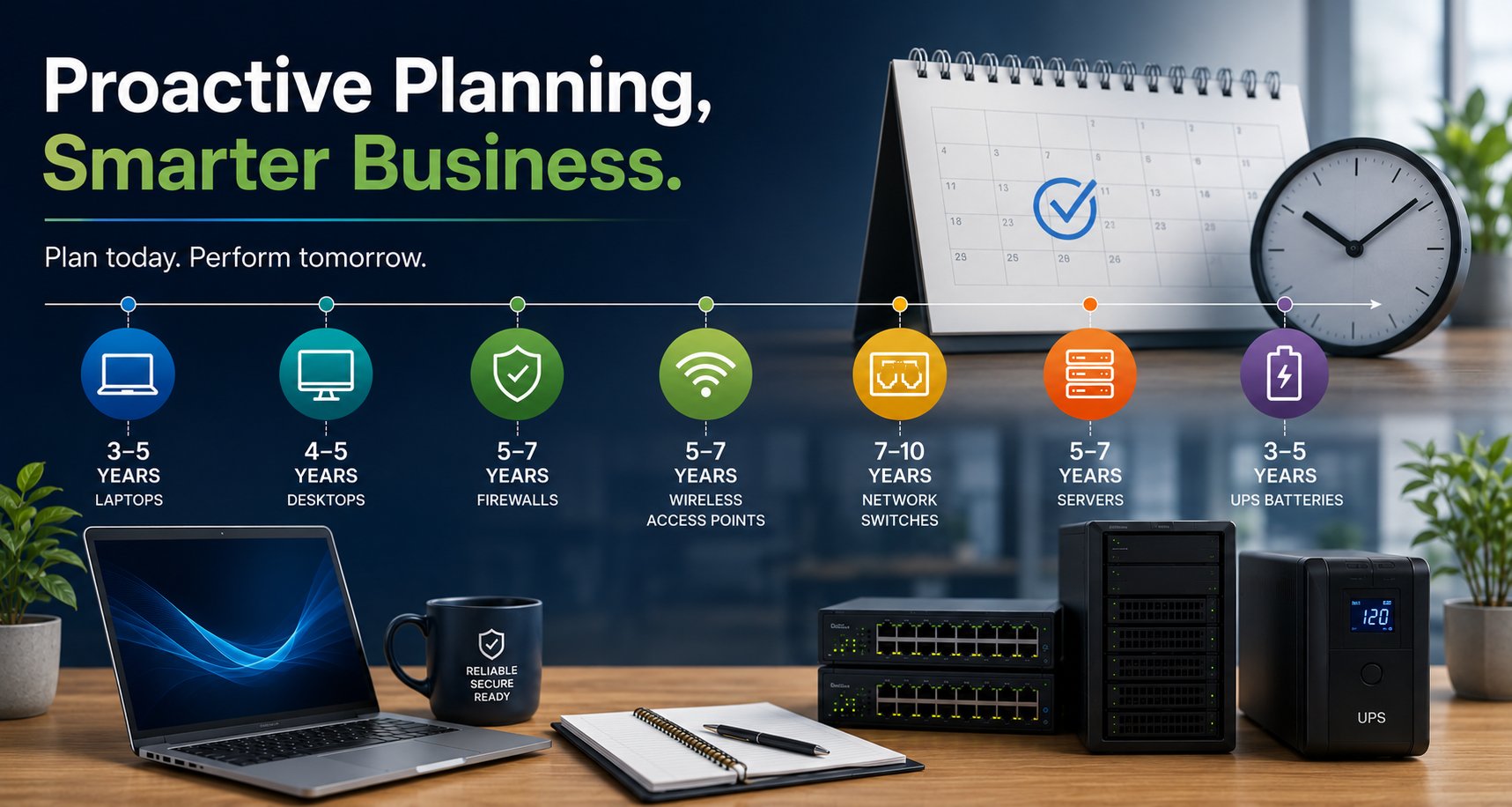
Recommended Hardware Replacement Guidelines
Every organization is different, but the following planning framework works well for many accounting firms.
| Technology | Recommended Planning Lifecycle |
|---|---|
| Business Laptops | 3-5 years |
| Desktop Computers | 4-5 years |
| Network Firewalls | 5-7 years |
| Wireless Access Points | 5-7 years |
| Network Switches | 7-10 years |
| On-Premises Servers | 5-7 years |
| UPS Batteries | 3-5 years |
These are planning guidelines rather than strict replacement deadlines.
Actual replacement timing should consider:
- Manufacturer support
- Warranty status
- Performance
- Software compatibility
- Security requirements
- Business growth
The goal is to avoid running critical systems beyond the point where reliability becomes uncertain.
Planning Ahead Matters More Than Ever
One lesson we've learned from managing production hosting environments is that hardware isn't always immediately available when you need it. Enterprise-grade servers and networking equipment can occasionally experience extended manufacturer lead times, with certain models remaining on backorder for several months.
Waiting until critical infrastructure fails can leave businesses scrambling to find replacement hardware during a time when availability may be limited. Building hardware refreshes into a long-term technology roadmap gives organizations the flexibility to order equipment well before it becomes an emergency.
Our experience operating production hosting infrastructure has reinforced an important principle: successful technology isn't just maintained, it's planned. This same proactive planning mindset is one reason production hosting experience matters when choosing an MSP.
The Hidden Costs of Keeping Hardware Too Long
Businesses often focus on the cost of purchasing new equipment while overlooking the ongoing costs of aging technology.
Those hidden costs may include:
Reduced Productivity
Older computers often struggle with modern business applications.
Employees may experience:
- Longer startup times
- Slow application performance
- Delayed file access
- Frequent system freezes
- Reduced multitasking capability
Small delays repeated throughout the day can have a measurable impact on productivity.
Increased Support Costs
Older equipment typically generates more support requests.
Examples include:
- Hard drive failures
- Memory issues
- Battery problems
- Driver conflicts
- Compatibility issues
- Performance troubleshooting
Instead of investing in strategic improvements, IT teams spend more time maintaining aging hardware.
Greater Security Risk
Manufacturers eventually stop supporting older hardware and operating systems.
Once support ends, businesses may face:
- Missing security updates
- Unsupported firmware
- Compatibility limitations
- Increased vulnerability to cyber threats
Running unsupported systems increases operational risk and may create challenges during client security reviews, regulatory assessments, or cyber insurance renewals. Replacing aging hardware is only one part of protecting your firm. It should also be paired with modern security controls and a technology environment that supports current compliance expectations.
Unplanned Downtime
Hardware rarely fails at a convenient time.
Unexpected failures often occur during:
- Busy tax seasons
- Payroll processing
- Client meetings
- Financial reporting deadlines
Planned replacement is almost always less disruptive than emergency replacement.
Signs It's Time to Upgrade
Not every replacement decision should be based solely on age.
Other indicators include:
- Employees regularly complain about performance.
- Systems require frequent repairs.
- The manufacturer no longer provides support.
- Software updates cannot be installed.
- Security features are unavailable.
- Warranty coverage has expired.
- New applications require more resources.
- IT support costs continue increasing.
When multiple warning signs appear together, replacing equipment often becomes the more cost-effective decision.
Leasing vs. Buying Business Technology
One question we frequently hear is whether businesses should lease or purchase their technology.
The answer depends on each organization's financial strategy and growth plans.
Purchasing
Advantages:
- Full ownership
- No recurring lease payments
- Long-term asset value
- Greater flexibility
Considerations:
- Larger upfront investment
- Less predictable refresh cycles if budgeting is inconsistent
Leasing
Advantages:
- Predictable monthly costs
- Easier hardware refresh planning
- Improved cash flow
- Equipment replacement on a scheduled cycle
Considerations:
- Ongoing payment obligations
- Total cost may be higher over time
Business owners should discuss tax implications with their accountant before choosing either approach.
Build a Technology Roadmap Instead of Reacting
One of the most valuable services an MSP can provide is helping clients create a long-term technology roadmap.
Rather than asking, "What needs replacing this month?" ask:
- What equipment reaches end of life next year?
- How many employees are we planning to hire?
- Will we open another office?
- Are there upcoming software upgrades?
- What cybersecurity improvements should we budget for?
A technology roadmap transforms hardware replacement from an emergency expense into a planned business investment. It also allows businesses to spread technology costs over time instead of being surprised by large, unplanned purchases. If you're evaluating outside IT support, understanding how Managed IT services are priced for accounting firms in California can help you build a realistic long-term technology budget.
How Everleap Helps Clients Manage Technology Lifecycles
At Everleap IT, we believe technology should support business growth, not create unexpected interruptions.
Our lifecycle planning process includes:
- Hardware inventory management
- Warranty tracking
- Asset lifecycle planning
- Budget forecasting
- Procurement guidance
- Standardized hardware recommendations
- Deployment and configuration
- Ongoing monitoring
- Strategic technology reviews
Our experience managing production hosting environments for more than 20 years has reinforced the importance of proactive maintenance, capacity planning, and operational discipline.
We bring that same operational discipline to every accounting and financial firm we support throughout California's Inland Empire. Our goal isn't simply to replace equipment when it fails. It's to help clients build predictable technology lifecycles that improve reliability, strengthen security, and support long-term business growth.
If your current IT provider is mostly reacting to problems instead of helping you plan ahead, it may be time to evaluate whether you're receiving the strategic guidance your business needs.
Technology Planning Is an Investment in Business Stability
Replacing hardware isn't about owning the newest computers.
It's about ensuring your employees have reliable tools, protecting sensitive client information, and avoiding the operational disruption that comes from aging technology.
A structured hardware lifecycle helps businesses improve productivity, reduce risk, simplify budgeting, and support long-term growth.
For accounting firms where uptime and reliability directly affect client service, proactive technology planning is one of the smartest investments a business can make.
Ready to Build a Smarter Technology Lifecycle?
At Everleap IT, we help accounting firms, financial services organizations, and small businesses throughout California's Inland Empire, including Rancho Cucamonga, Ontario, Claremont, and nearby communities, take a proactive approach to technology planning. From hardware inventories and lifecycle planning to procurement, deployment, and ongoing management, we help clients replace technology strategically before aging equipment impacts productivity, security, or reliability.
Our experience managing production hosting infrastructure for more than 20 years has taught us that successful technology environments don't happen by accident. They require thoughtful planning, standardization, and the discipline to stay ahead of hardware lifecycles, software requirements, and business growth.
Whether you're preparing for your next hardware refresh, strengthening cybersecurity, or looking for a Managed IT partner who focuses on long-term planning instead of reactive support, we're here to help.
If you'd like a clearer picture of where your technology stands today, we'd be happy to perform a hardware lifecycle assessment and help you build a practical roadmap that supports your business for years to come. Contact us to discuss your IT situation and schedule a technology assessment.