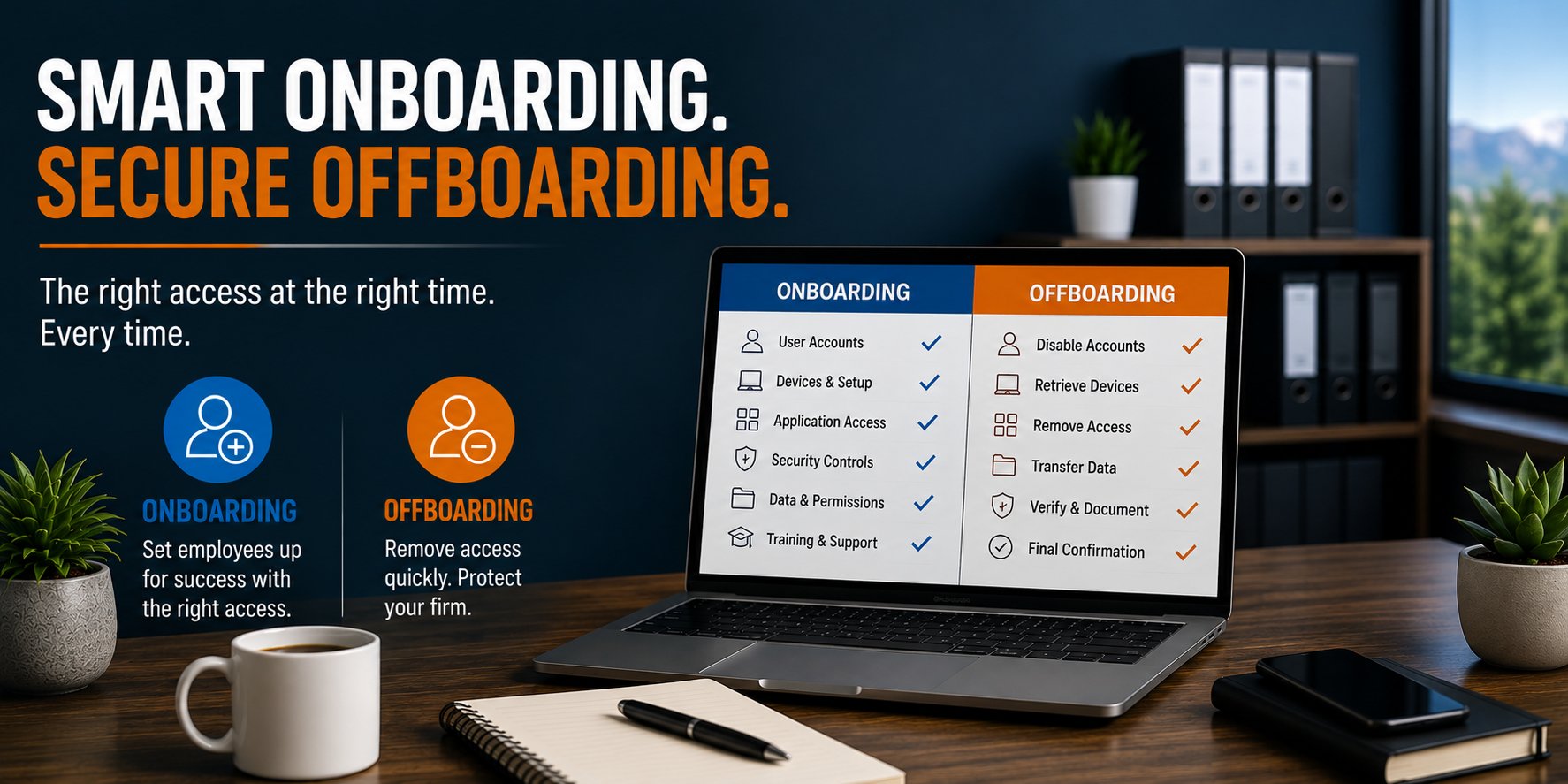
An accounting firm's IT onboarding and offboarding process should cover at least six areas: user accounts, computers and devices, application access, security controls, data ownership, and final access verification.
For a 5 to 25 employee accounting firm, a documented process can help accomplish two important goals. New employees can become productive faster, and departing employees can lose access to sensitive systems promptly and consistently.
A practical target is to have a new employee's computer, Microsoft 365 account, required applications, security settings, and permissions ready before their first day. For departing employees, access should generally be disabled at the agreed termination time, with ownership of business data and communications addressed as part of the same process.
The objective is simple: The right person should have the right access at the right time, and no longer than necessary.
Why Onboarding and Offboarding Are IT Operations, Not Just HR Tasks
Hiring and employee departures usually begin with HR or firm leadership. But both events create a series of technology changes. When someone joins the firm, they may need access to:
- Microsoft 365
- Tax software
- Practice management
- Document management
- Client portals
- File shares
- Accounting applications
- Printers and scanners
- Remote access
- Multi-Factor Authentication
- Firm computers and other devices
When someone leaves, many of those decisions need to be reversed. The problem is that technology access tends to accumulate.
An employee may start with one role, receive additional permissions over several years, gain access to new applications, join shared mailboxes, receive administrative privileges, and acquire multiple devices.
Without a documented process, onboarding becomes inconsistent and offboarding can become incomplete. That creates both an operational problem and a security problem.
A useful approach is to manage the employee technology lifecycle through six areas.
1. Start With a Defined Access Profile
A new employee should not receive access based on someone saying:
"Give them whatever Susan has."
That may be convenient, but it assumes Susan's access is appropriate, current, and relevant to the new employee's responsibilities. Instead, access should be based on the person's role.
For example, a tax preparer might require:
- Microsoft 365
- Tax preparation software
- Document management
- Appropriate client folders
- Practice management
- Client portals
- Printing and scanning
- Approved remote access
A firm administrator may require a different set of applications and permissions. A partner may require access to additional financial, administrative, or management resources. The firm should define common access profiles where practical and then handle exceptions deliberately.
Apply the Principle of Least Privilege
Users should generally receive the access required to perform their responsibilities without automatically receiving access to everything. This is the principle of least privilege.
It can help reduce:
- Accidental access to sensitive information
- Unnecessary exposure if an account is compromised
- Permission complexity
- Access that remains after an employee changes roles
Not every 10-person accounting firm needs an elaborate identity-governance platform. It does need a repeatable way to determine who should have access to what.
2. Prepare the Employee's Technology Before Day One
A new employee's first morning should not begin with several hours of waiting for accounts to be created and software to install. Whenever practical, IT should receive sufficient notice to prepare the environment in advance.
A typical onboarding request should identify:
- Employee name
- Start date
- Job role
- Manager
- Office or remote location
- Computer requirements
- Email requirements
- Applications required
- File or folder permissions
- Shared mailboxes
- Distribution groups
- Remote-access requirements
- Special hardware requirements
IT can then prepare the workstation and accounts according to the firm's standards.
Standardize the Computer Build
Every new computer should meet a defined production standard before being issued.
That may include:
- Supported operating system
- Current patches
- Endpoint security
- Disk encryption
- Microsoft 365 applications
- Required accounting applications
- Approved browser configuration
- Monitoring and management tools
- Security policies
- Appropriate user permissions
Standardization reduces variation between computers. That matters because inconsistent environments are harder to support, secure, and troubleshoot. A computer should not be considered ready simply because it turns on and can connect to Wi-Fi. It should be ready to perform the employee's role securely.
Standardizing deployment also works best when it is supported by a defined computer lifecycle strategy, so new equipment is selected, configured, maintained, and eventually replaced according to consistent standards.
3. Configure Identity and Security From the Beginning
Security should be part of onboarding rather than something added later. A new employee's account and computer should be configured according to the firm's established cybersecurity controls and identity standards from the start.
Depending on the environment, that can include:
- Multi-Factor Authentication
- Microsoft Entra ID policies
- Conditional Access
- Password-management requirements
- Device enrollment
- Endpoint protection
- Disk encryption
- Email security
- Approved remote access
- Security awareness training
The employee should also understand how to use those controls. For example, simply enabling MFA does not teach someone how to recognize an unexpected authentication prompt. Technical controls and employee expectations should reinforce one another.
Avoid Shared User Accounts
Employees should normally have individual identities rather than sharing credentials for convenience.
Individual accounts improve:
- Accountability
- Auditing
- Permission management
- Offboarding
- Security investigations
If several employees use the same login for a business application, removing one employee's access can become much more difficult. Where an application supports individual user accounts, use them.
4. Treat Role Changes Like Mini Onboarding and Offboarding Events
Employee access should not remain static simply because someone stays with the firm. People change roles. They get promoted. They move between departments. Their client responsibilities change. They take on administrative functions. When that happens, firms often remember to add new access but forget to remove old access. Over time, the employee accumulates permissions that are no longer necessary. This is sometimes referred to as permission or privilege creep.
A role change should therefore trigger two questions:
What new access does this employee need? And What access do they no longer need?
That makes role changes a combination of onboarding and offboarding activities. Periodic access reviews can also help identify permissions that no longer match current responsibilities.
5. Create a Coordinated IT Offboarding Process
Offboarding deserves just as much planning as onboarding. The process should begin with a clear instruction from authorized firm leadership identifying:
- Employee
- Final working date
- Final working time
- Whether the departure is planned or immediate
- Who should receive the employee's email
- Who should receive business files
- Which devices must be returned
- Any special access considerations
Timing matters. Disabling an account too early can interfere with legitimate work. Disabling it too late can leave a former employee with unnecessary access. For a normal planned departure, IT and leadership should agree on the exact cutoff. For an involuntary or higher-risk departure, coordination may need to occur in real time.
What Should Be Disabled or Reviewed?
Offboarding may involve more than turning off email. The firm should consider:
- Microsoft 365 account
- Microsoft Entra ID access
- Tax applications
- Practice management
- Document management
- VPN or remote access
- Client portals
- File shares
- Cloud applications
- Password manager
- Administrative accounts
- Shared credentials
- Mobile-device access
- Physical devices
The exact list depends on the employee. That is why accurate IT documentation matters. You cannot reliably remove access you do not know exists.
6. Preserve Business Data and Verify Completion
Disabling access is not necessarily the final step. The firm may still need information associated with the employee. Before deleting accounts or data, determine what needs to happen to:
- OneDrive files
- Client documents
- Shared files
- Contacts
- Calendar information
- Business records
- Application data
For example, an employee's mailbox might need to be retained or made available to an authorized manager. OneDrive data may need to be transferred. Client responsibilities may need to be reassigned. The appropriate retention decisions should reflect the firm's business, legal, regulatory, and records-management requirements. IT's role is to make sure the technology changes support those decisions.
Perform a Final Verification
A strong offboarding process should end with verification. Do not assume that submitting a request means every access path was removed. Confirm that required actions were completed. A simple checklist might verify:
- Microsoft 365 disabled: Yes
- Remote access removed: Yes
- Business applications addressed: Yes
- Devices returned: Yes
- Email ownership addressed: Yes
- Business files transferred: Yes
- Administrative access reviewed: Yes
- Shared credentials changed where necessary: Yes
That final verification closes the loop.
How Quickly Should an Accounting Firm Onboard a New Employee?
The best metric is not how quickly IT can create an account after the employee arrives. It is whether the employee is ready when expected. For a standard employee, firms should strive to submit onboarding information several business days before the start date whenever possible.
That gives IT time to:
- Confirm requirements
- Prepare or procure hardware
- Create accounts
- Configure security
- Install applications
- Apply permissions
- Test the environment
Hardware procurement may require additional lead time, particularly if the firm's standard equipment is not already available. Last-minute hiring will happen occasionally. It should be the exception rather than the operating model. A useful internal metric is:
What percentage of new employees have a fully prepared technology environment when they begin work?
If new hires routinely spend their first morning waiting for IT, the problem may be the process rather than the technology.
How Quickly Should Access Be Removed When Someone Leaves?
This is a different question. For a departing employee, the appropriate target is generally tied to the authorized termination time, not an arbitrary number of hours or days. If leadership says an employee's access should end at 5:00 PM Friday, the process should support that requirement. For an immediate termination, access may need to be disabled as the employment action occurs.
The important operational principles are: Clear authorization. Clear timing. Complete execution. Verification.
A vague message saying "John is leaving sometime next week" is not sufficient for a reliable offboarding process.
A Common Failure: The Forgotten SaaS Account
Microsoft 365 and the firm's primary accounting applications may be obvious. Smaller cloud applications are easier to overlook. Consider an employee who has accumulated access to:
- Electronic signature software
- A client portal
- A project-management tool
- A cloud PDF service
- A vendor support portal
- A payroll platform
- An industry research service
Some of these accounts may have been created directly by the employee rather than centrally provisioned by IT. When the employee leaves, the organization may not know those accounts exist. This is one reason application inventories and standardized procurement matter. The more decentralized software adoption becomes, the harder complete offboarding becomes.
Onboarding and Offboarding Should Be Documented and Repeatable
A good process should not depend on who happens to handle the request. If three different employees join the same role, their basic technology configuration should be substantially consistent. If three employees leave, the firm should have confidence that the same critical access checks occur each time.
That requires:
- Defined responsibilities
- Standard forms or requests
- Role-based access requirements
- Technology standards
- Checklists
- Documentation
- Final verification
The process does not need to be complicated. It needs to be repeatable.
A Practical Example: The Friday Departure
Consider a 20-person accounting firm where an employee's final day is Friday. Without a defined process, leadership emails IT late Friday afternoon. Microsoft 365 is disabled, but nobody remembers that the employee also has VPN access, a tax application account, a client portal account, and access to a shared password. On Monday, those gaps have to be investigated individually.
Now consider the same departure with a documented process. Several days beforehand, authorized leadership submits the offboarding request with the exact termination time. IT reviews the employee's documented access, coordinates data ownership, confirms device return, disables access at the agreed time, addresses shared credentials where required, and completes a final verification checklist.
The difference is not a sophisticated technology product. It is operational discipline: documented processes, defined responsibilities, consistent execution, and verification. That same principle applies to how business-critical technology is operated throughout the firm, not just during employee transitions.
Employee Technology Lifecycle Is Part of Production Readiness
At Everleap IT, we view onboarding and offboarding as part of operating a Production Ready technology environment. Production Readiness is not limited to servers, networks, backups, and cybersecurity tools. People interact with those systems every day. When someone joins, changes roles, or leaves, the technology environment changes with them. Those changes should be managed deliberately.
A mature employee technology lifecycle helps support:
- Security
- Productivity
- Documentation
- Access control
- Asset management
- Application management
- Operational consistency
- Business continuity
The objective is to reduce uncertainty. Leadership should know that new employees receive the technology they need and departing employees no longer retain access they should not have.
How Everleap IT Approaches Employee Technology Changes
Our approach has been shaped by more than 20 years of operating production hosting environments, where access control, documentation, change management, security, and operational consistency are everyday requirements.
For accounting firms, that mindset can be applied through:
- Standardized computer deployment
- Microsoft 365 account management
- Microsoft Entra ID
- Multi-Factor Authentication
- Role-based access
- Application management
- Asset tracking
- Onboarding procedures
- Offboarding procedures
- Documentation
- Production Readiness assessments
Technology should support the employee lifecycle rather than create friction around it.
Is Your Accounting Firm's Onboarding and Offboarding Process Ready?
Start with six questions:
- Do we know what access each role should receive?
- Are new employees' computers and accounts ready before they start?
- Are security controls applied consistently from day one?
- Do we review access when employees change roles?
- Can we remove all access promptly when someone leaves?
- Do we verify that offboarding was actually completed?
If several answers depend on memory, informal emails, or one person's knowledge, there may be an opportunity to improve the process.
Everleap IT helps accounting firms throughout California's Inland Empire, including Rancho Cucamonga, Ontario, Upland and nearby communities, improve employee technology operations through standardized onboarding and offboarding, identity management, Microsoft 365 administration, cybersecurity, documentation, lifecycle management, and Production Readiness assessments.
If your firm wants to evaluate whether its onboarding and offboarding processes provide the consistency, security, and operational control the business requires, a technology assessment can help identify gaps and opportunities for improvement. Reach out today to discuss your IT environment and book an assessment.